
FAQs
Frequently asked questions about content marketing, SEO, WordPress, and more.
Frequent questions people ask with well-researched answers. Spot something off? Let me know. Have a nagging question? Feel free to ask a question at the bottom of the page.
Also, answer any frequently asked questions from the list in the same form. I will give you full credit and link to your website.
FAQs about Search Engine Optimization (SEO)
Do I need to optimize every page on my WordPress website?
The temptation here is to optimize every page for search engines, but the simple answer is no.
Create unique titles and meta descriptions for all pages, but beyond this, focus on high-value content targeting your primary and secondary keywords.
While at it, remember to optimize blog posts and pages with lots of engagement, e.g., comments, links, and shares.
I say this because you might be sitting on content that could drive more traffic and revenue with some SEO tweaks.
Some pages, like the privacy policy and terms of service, need minimal, if any, SEO.
How often should I update on-page content for SEO?
Google bots, AI tools, and human readers crave fresh content. For this reason, update your website content monthly. You’ll always find something to fix.
And for crying out loud, don’t go a year without updating your website content.
At the same time, publish new blog posts weekly (or daily if you have writers), and update old articles monthly. Note that the fresher the content, the better.
Just don’t focus too much on quantity and forget the quality of content. This is for folk abusing AI tools to create slop at scale. We see you.
Also update your content if your rankings drop suddenly, and as soon as information is obsolete.
You don’t want titles that read “Top XX SaaS Tools in 2024” when we’re in 2026.
Or a list of WordPress plugins from two years ago with tools that no longer exist. These are just examples; I’m sure you understand what I mean.
There are exceptions, of course, e.g., when you reference important data, events, and sources from years ago. If you’re talking about World War II, for instance, no one expects you to say it happened in 2026.
Posting new content regularly (and updating old material) keeps your website relevant, helping you compete with businesses targeting the same keywords.
Do meta descriptions affect search engine rankings?
No, and Yoast SEO will eat me up for this 🙂 The meta description is not a direct ranking factor.
Besides, Google can pick different text from your content to use in search results. For example, this post I rank first for “WooCommerce Payments vs. PayPal” and “woocommerce vs paypal.”
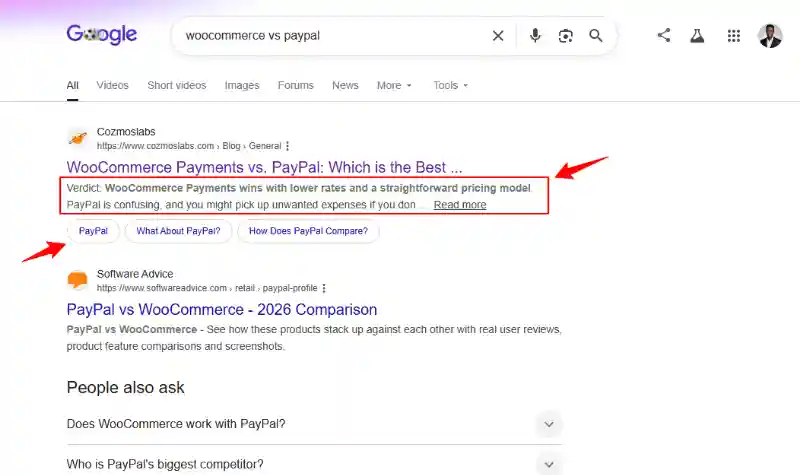
Notice, also, the featured snippets below the meta description.
Suffice it to say, this is not the meta description I wrote for the article.
What a clear and compelling meta description does is improve your click-through rate. It encourages readers to visit your site.
This indirectly improves SEO performance over time because a higher click-through rate signals to Google that your website is valuable.
So, write interesting, keyword-rich meta descriptions to make people click. This also applies to your blog post excerpts and content before the “–Read More–” Gutenberg block/tag.
Should every WordPress page or post target a single keyword?
This is a frequently asked question, and answers from our favorite gurus vary. But for optimal results, target a unique keyword for each page or post.
Working with a single keyword prevents cannibalization (yes, this is a real problem).
Then use related secondary (and especially long-tail) keywords to support your primary focus.
Create separate pages for each primary keyword to avoid competing against yourself in search engines.
Can I use the same content across multiple pages?
This is another frequently asked question from many beginners. And the answer is a big NO.
Don’t do it. Avoid it like the plague.
Using the same large bodies of content on multiple pages leads to duplicate content issues. This confuses search engines and hurts your rankings.
Google and other search engines won’t know which page to rank. So, the algorithm will deindex the pages, which sucks because you won’t rank.
Yep, duplicate content is bad news.
Combine the material, redirect readers to the main page, or use canonicalization (with caution) if you have similar content on separate pages.
Or create original content for each page from scratch. This is way easier.
How do I know if a page matches user intent?
Several people frequently ask this question on this page, so here’s a quick answer. You know a page on your WordPress site matches user intent if it appears high in SERPs for your query.
Also, what type of content is the competition ranking for the same query? Are they how-to guides or reviews? Case studies or product pages?
This question is important because there are four primary search intents:
- Informational – The searcher is looking to learn something. They are trying to fix a certain problem. Content types include how-to guides, listicles, and tutorials.
- Navigational – The user is trying to find your website or other digital properties. The search queries often include brand names. Useful pages include your homepage, about us, info pages, and so on.
- Commercial – The searcher is further down in the buyer funnel. They are considering their options. Example content types include comparisons, reviews, listicles, alternatives, etc.
- Transactional – Searchers are seriously considering buying. Queries include keywords “Buy,” “coupon,” “deal,” “shipping,” “sign up,” “best price,” “pricing.” e.g., “SEO services pricing,” etc.
Determine the searcher’s intent before creating your content, and you’ll surely rank first in Google.
Does your article rank well for the intended search intent? If yes, you did a superb job. If no? Fix it.
What are the most important on-page SEO elements?
On-page SEO is all the things you do on your website to rank higher on Google. The main aim is to show Google you offer helpful, relevant, people-first content and your website is user-friendly.
The most important on-page SEO elements include:
- Page/post titles.
- Meta descriptions.
- Headings.
- Keyword placement.
- Internal linking.
- Image optimization.
- Structured data.
- URL structure.
- Content quality and relevance.
On-page SEO is a huge part of SEO, but so is off-page and technical SEO.
Does Google read the alt text?
According to Google, “alternative text (alt text) is short, descriptive text that acts as a substitute for visual items on a page. The most common use is for describing images.”
Now, to answer your question, yes, Google reads alt text for web search and image search. The alt text helps Google bots understand what your image is all about.
In addition, alt text helps people using screen readers understand your images. This is why it’s important to write clear, descriptive, and keyword-optimized alt texts.
Unanswered questions (Answer any in the form below):
- does Google read alt text?
- can you over-optimize a page?
- is word count a ranking factor?
- What is technical SEO in simple terms?
- how is technical SEO different from on-page SEO?
- how do I know if my site has technical SEO issues?
- what tools help with technical SEO audits?
- is technical SEO hard to learn?
- what is off-page SEO?
- how does off-page SEO impact rankings?
- what is an example of off-page SEO?
- what is more important: on-page or off-page SEO?
- how can I earn backlinks to my site?
- how do I check my off-page SEO?
- are backlinks still important?
- what is a high-quality backlink?
- is social media part of off-page SEO?
- This list will keep growing. And I will keep answering 🙂 If you can lend a hand, do so in the form below.